AI Tools for Med Spas: Booking and Front Desk Guide
Nov 6, 2026

Portrait Care Team
The Portrait Team

Empowering Professionals at Every Stage
Portrait offers strategic expertise to help you make informed decisions and achieve long-term success.
Book Intro CallChoose AI tools for med spas by the work you need them to handle: booking, front-desk questions, patient follow-up or staff tasks. As you consider AI trends, keep the evaluation grounded in your calendar, patient records and staff responsibilities.
For an established independent med spa, start with a specific situation: an after-hours booking request, a reschedule or an opening on tomorrow's calendar. Ask what the tool can read, what it can change and where staff can review its work. Use the checklist below to compare those answers.
What AI tools do med spas use today?
The categories to evaluate include booking assistants, voice receptionists, reminders, waitlists, marketing drafts, staff copilots and skin analysis or imaging tools. Treat these as separate jobs when comparing software. An AI feature for drafting a campaign does not establish that the same software can answer calls or book appointments.
Use this table to define your requirements before reviewing a vendor's demonstration. The functions are evaluation scopes, not verified capabilities of any particular product.
Include ordinary automation in your comparison, even when your search starts with AI. Ask which actions involve generated responses and which follow settings your team configures. Judge each against the task you need completed, rather than the label on the feature.
Keep skin analysis and imaging in a separate evaluation. Do not treat an administrative software demonstration as evidence for an imaging claim. Ask for support specific to the proposed function before including it in your decision.
How does AI booking and front-desk automation work?
AI booking and front-desk automation should connect patient requests with live availability, service rules and a record staff can review. An AI receptionist or chatbot can only book correctly if it reads the live calendar and follows those rules. Test that connection directly.
Follow a booking from request to calendar
Start the demonstration with a patient asking for an appointment through chat. Have the vendor show whether the assistant completes the booking or supplies a booking link. Then inspect the calendar entry and patient record. Ask your front-desk team to identify anything they would still need to enter.
Check the booking link separately. Ask how it presents a deposit requirement, collects payment and keeps a card on file for a cancellation fee. Distinguish a deposit collected at booking from a fee charged after a late cancellation or no-show. Ask the vendor to demonstrate your intended setup.
Test the changes that follow
Next, change the appointment and inspect the reminder settings. Ask whether reminders use SMS, email or both, and how staff choose their timing. Have the vendor show what happens to the original reminder after a reschedule. Check where confirmation replies appear and who handles them.
For waitlist offers, follow an opening from availability through the offer and its response. Ask where staff see waiting patients and offer status. Have the vendor explain how an accepted offer becomes an appointment, including any step that still requires a person.
Give after-hours questions a defined boundary
For after-hours support, separate answering a question from completing a request. Ask which practice-approved information the assistant can use and which requests it passes to staff. Test an unanswered question, a reschedule request and a patient who asks for a person.
Check two-way texting in the same demonstration. Identify where the conversation appears, how staff respond and whether appointment details remain visible beside it. Before choosing a tool, assign responsibility for reviewing requests that arrive when the front desk is closed.
Should a med spa use an AI receptionist?
Consider an AI receptionist when it can handle your defined front-desk tasks, record its work and reliably hand requests to a person. Make the decision around a demonstrated workflow. A description such as "AI appointment booking" leaves too much unanswered on its own.
Use these checks with every candidate. Ask the vendor to show the behavior in a demonstration and identify any setup or staff action it requires.
- Reads and writes the real calendar: Demonstrate a new booking and a reschedule. Inspect the resulting entries and check that the assistant follows service rules.
- Hands off to a person: Test a request the assistant cannot complete. Identify who receives it, where it appears and what happens after hours.
- Logs every conversation on the patient record: Inspect the conversation history after a call or chat. Ask how staff find the request and its resolution.
- Signs a business associate agreement: Ask for the agreement covering the proposed use of patient information. Have your attorney or compliance adviser review its applicability.
- Handles consent for texting: Ask how the system records consent, handles opt-out requests and makes communication preferences visible to staff.
Also ask what happens when calendar access is unavailable or a patient request is unclear. Require a concrete explanation of the fallback and staff notification. Do not count an appointment as completed until the demonstration shows it in the calendar.
If your main need is reminders or message drafts, evaluate those functions directly. You can assess an AI receptionist separately from the software that supports other administrative work.
Why do separate booking, charting and follow-up tools slow a practice down?
Separate tools slow work when staff must move or reconcile booking changes, chart information and follow-up messages between systems. Evaluate that extra work through concrete situations your team can test.
Consider a reschedule text sitting on a personal phone. Until someone updates the shared calendar, another staff member may work from the original appointment. Ask where the request should arrive and how the changed appointment becomes visible to everyone handling it.
Now consider a no-show that is not visible to the person preparing a promotional message. That person would need another record to understand the appointment history. Check whether the follow-up workflow puts that context within reach before staff send anything.
A deposit tracked in another system creates a similar question during a reschedule. Where does the staff member check its status? Have the vendor walk through that lookup, including any information someone must copy or enter again.
For a connected setup, picture a shared calendar with patient messages kept on the patient record alongside appointment history. Use that arrangement as a comparison point when deciding what your team needs to see together.
When evaluating one connected system, look for:
- A shared calendar where staff can see bookings and reschedules without checking a separate message inbox for the latest version.
- Patient conversations attached to the patient record, with appointment history, no-shows and deposits visible alongside the thread.
- A clear route from an appointment to the relevant chart, with access appropriate to the staff member's role.
- Deposit and payment information staff can locate while handling a booking question or appointment change.
- Waitlist offers and responses that staff can review alongside current appointment availability.
- A defined review step for follow-up messages, with responsibility assigned before a campaign launches.
Ask vendors to show the entire sequence, including any external tool involved. Record the handoffs your team would still manage. Use those remaining steps to compare a connected system with your current mix of booking, charting and follow-up tools.
What HIPAA questions should you ask an AI vendor?
Ask how the vendor safeguards protected health information and whether it will document the required assurances in a business associate agreement. When a covered entity lets a business associate handle protected health information, HIPAA requires the covered entity to obtain satisfactory assurance. This assurance must confirm that the business associate will appropriately safeguard the information. That assurance must be documented in a written contract or other written agreement.
The HIPAA business associate rule (opens in a new tab) provides the underlying requirement. Confirm how it applies to your practice and the proposed arrangement with your attorney or compliance adviser. This guide is not legal advice.
Bring a specific workflow to that discussion, such as after-hours chat that creates an appointment. Ask the vendor:
- Will you sign a business associate agreement covering this service and its handling of protected health information?
- What patient information does the tool receive, and what information does it write back to our systems?
- Where are messages, call transcripts and any recordings stored, and who can access them?
- Which other companies receive or process the information, and how are those arrangements addressed?
- Is patient information used to train models, and how is that use addressed in the agreement?
- How do we retrieve or delete records, and what happens to the information when we stop using the service?
Treat these questions as requests for evidence, not as a claim that a particular vendor meets the requirements. Give your adviser the proposed agreement and the vendor's written answers. Review the actual service you plan to use, including its connections to other systems.
Where does Portrait fit?
Portrait offers Core EHR with scheduling, charting, payments, inventory and reporting, plus the administrative AI features described below. Portrait publishes this guide and the linked software comparisons. The product descriptions in this section reflect Portrait's information.
Core EHR is complimentary with Portrait membership. Access is through membership, which starts with a pre-load.
Booking and patient communication
Each location has an online booking link. Booking supports deposits and a card on file for cancellation fees. Automated appointment reminders can go by SMS, email or both at a set time before the appointment.
A waitlist under Scheduling supports offers to patients waiting for last-minute openings. Two-way SMS uses a dedicated business number. Conversations sit on the patient record beside appointment history, no-shows and deposits.
Administrative AI with user review
Copilot, in beta, lets Business Admin users request Core EHR tasks in plain language. These include setting up locations, services and staff, managing appointments and asking business questions. Copilot shows proposed changes and waits for confirmation before changing data.
Marketing campaigns, also in beta, include Create with AI for drafting a message sequence. The AI does not message patients on its own. The practice reviews, edits and launches the campaign.
Ask Portrait the same patient-information and business associate agreement questions you ask every vendor. The features described here do not establish a HIPAA or BAA claim.
Related reading
One Platform.
Everything You Need.
Everything You Need.
Portrait combines the technology, support, and savings to run and scale your modern medical wellness business.
Book Intro Call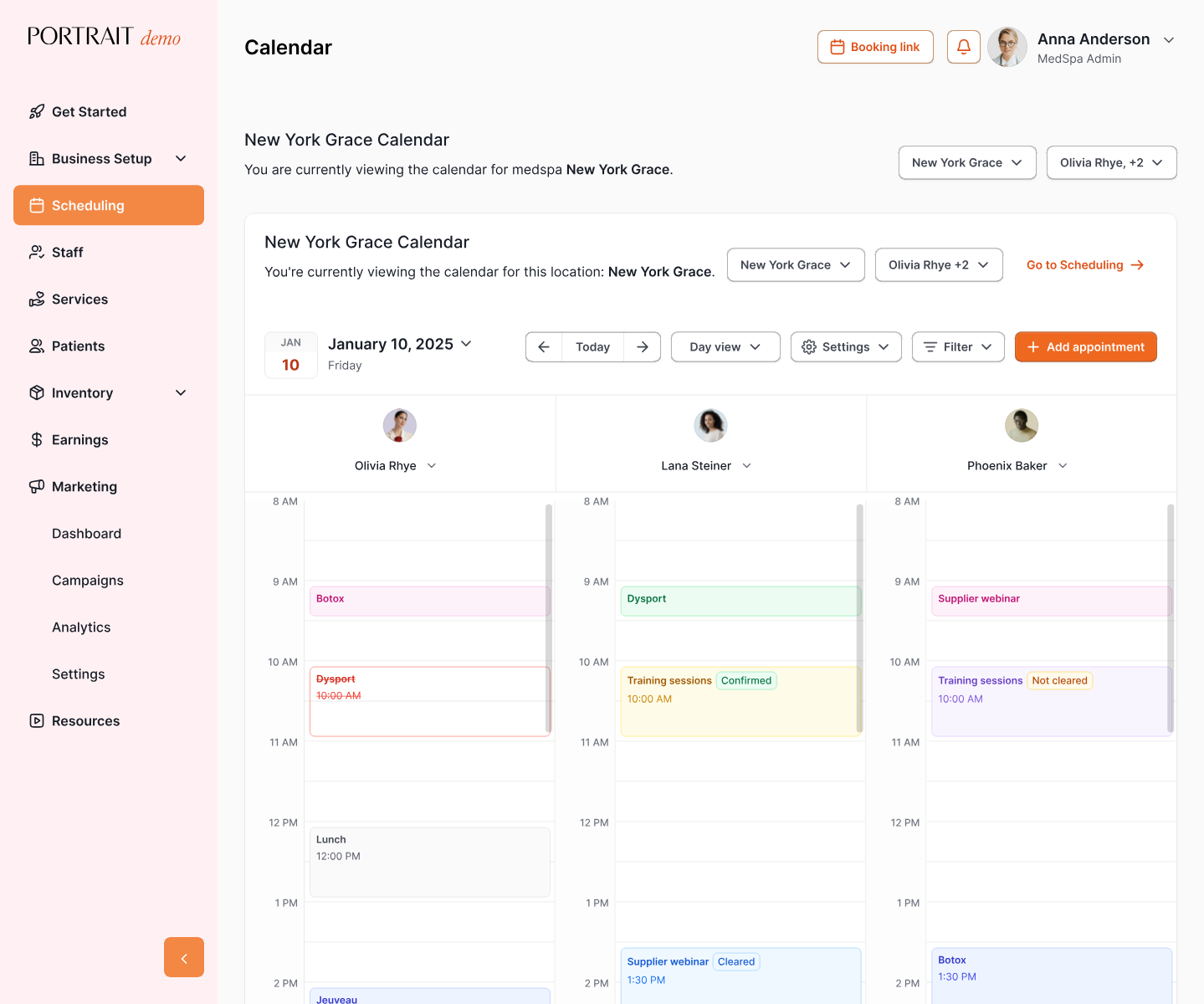

Stay Connected with Portrait Care
Subscribe to our email list and receive the latest insights, updates, and exclusive content delivered straight to your inbox.